Hooray! You’ve finally launched your new event service business in Singapore! 🎉
Whether you’re a home-based baker whipping up custom birthday cakes, a freelance face painter, or a setup decorator, taking that first big leap into the local event sector is a massive milestone. Now, it's time to take your passion project to the next level and watch your business grow.
When it comes to getting customers in Singapore, you have plenty of traditional options. You can spend hours figuring out Instagram or TikTok algorithms, chase leads in Facebook groups, or stress over writing blog posts for Google search. But let’s be real, managing social media and creating constant content takes up a lot of time you’d rather spend actually delivering amazing events.
What if there was a completely hands-off solution? A "set-and-forget" digital platform where local clients could find your exact services, allowing you to just focus on what you do best while waiting for those bookings to roll straight into your inbox?
In this quick guide, we’re sharing the ultimate roadmap to scaling your home-based event business locally. Plus, we'll show you exactly how to unlock a steady stream of new clients for free by listing your services on Planit, the new, zero-fee digital marketplace built specially to help Singaporean HBBs in event planning sector thrive.
Ready to get booked out? Let's dive in!
1. Account Creation
We are thrilled to have you on board for this exclusive launch phase. We’ve designed this guide to help you get your profile live and ready to book in just a few minutes.
The sign up is completed online on the following link:
Start listing your service
Where you are going to find the following fields
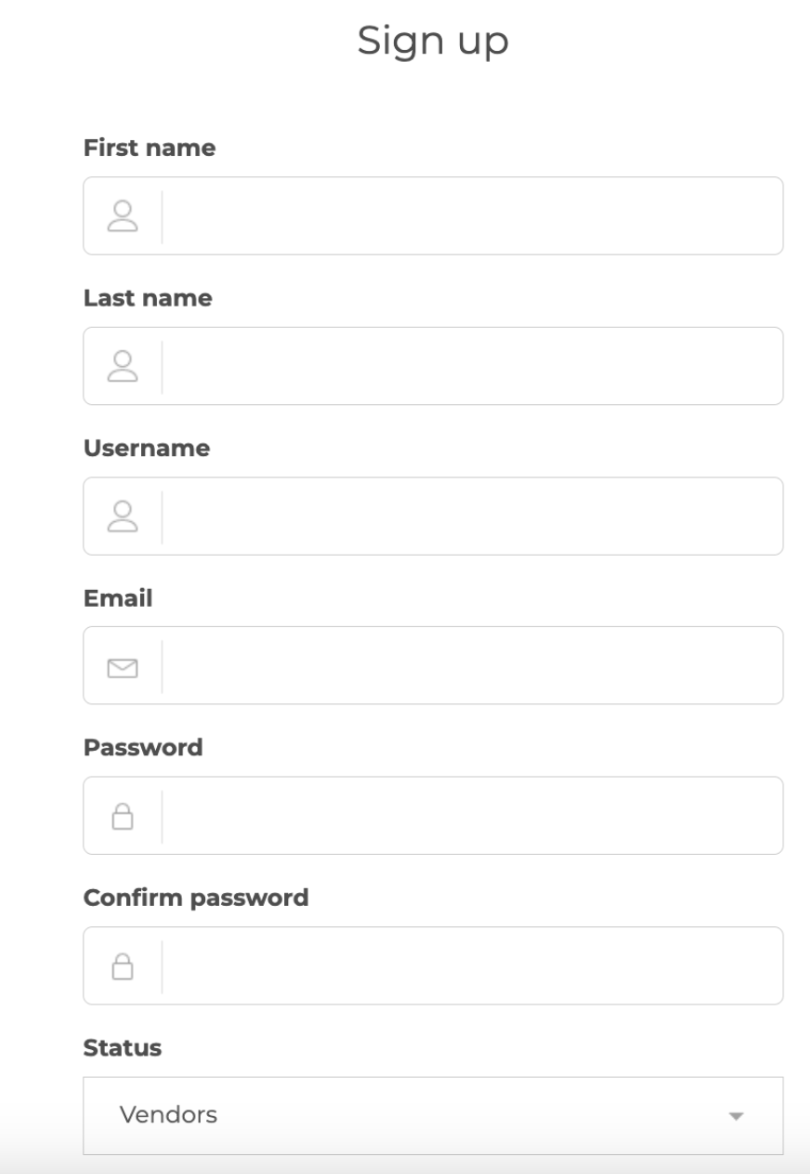
Planit supports local commerce. All registering entities must hold valid operational eligibility in Singapore.
We require valid UEN or NRIC verification to support a safe, compliant marketplace for all Singapore vendors.
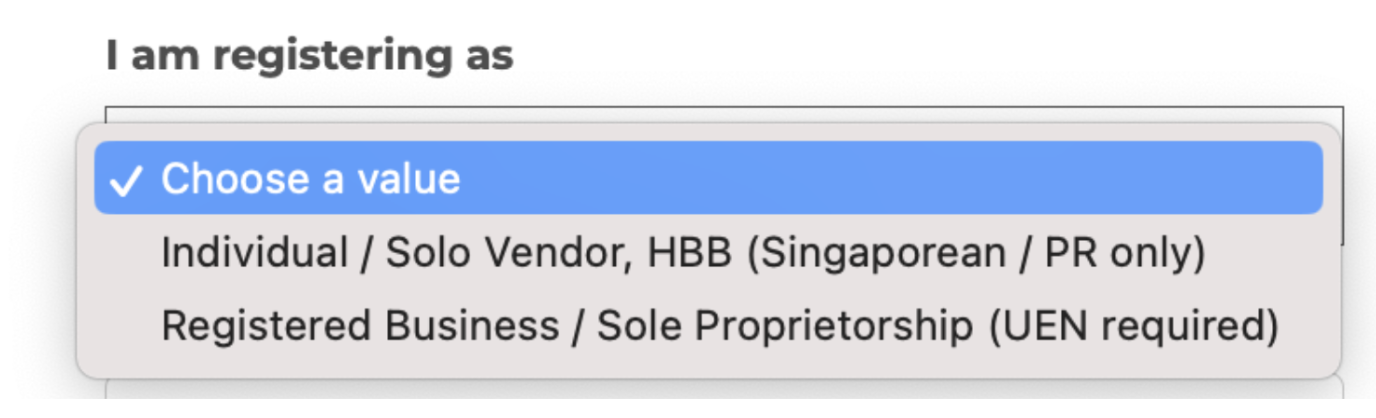
Registered Businesses (Companies & Sole Proprietors): Please provide your UEN.
Individual / Solo Vendors (HBBs): Please provide your NRIC.

We appreciate your help in keeping our community professional and compliant.
In the 'About Me' section, give a brief overview of your expertise and the events you specialize in. This is what clients see first!
Terms of Service: A mandatory checkbox to accept the terms of service of Partylah and Privacy Policy.
Terms of Service: A mandatory checkbox to accept the terms of service of Partylah and Privacy Policy.
- Verify Email:
After this process you'll receive an email to verify your account make sure to click on it. And make sure to review your SPAM folder.
Make sure to click on activate my account and confirm you can successfully log in.
- First Listing Creation:
You can create your first Listing on the pane on the top menu,
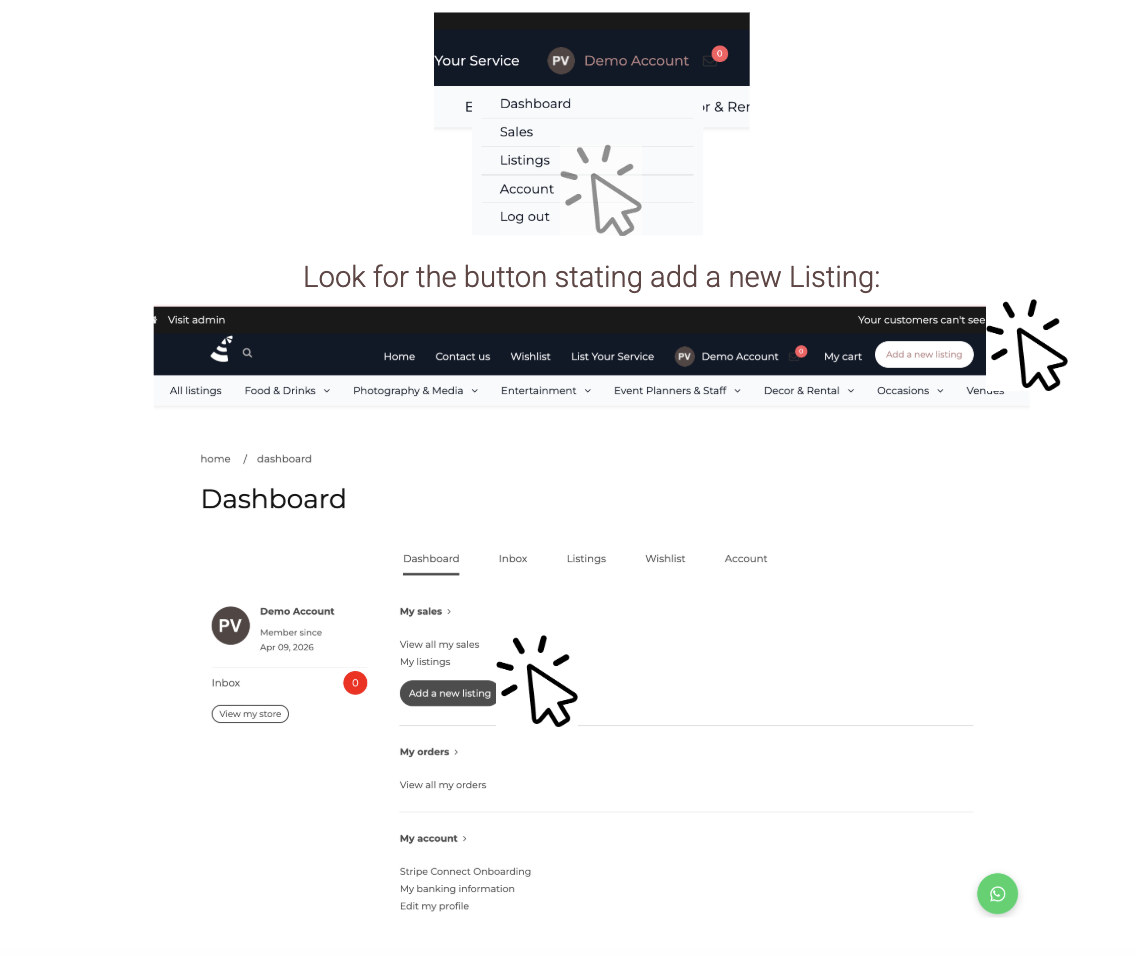
Look for the button stating add a new Listing: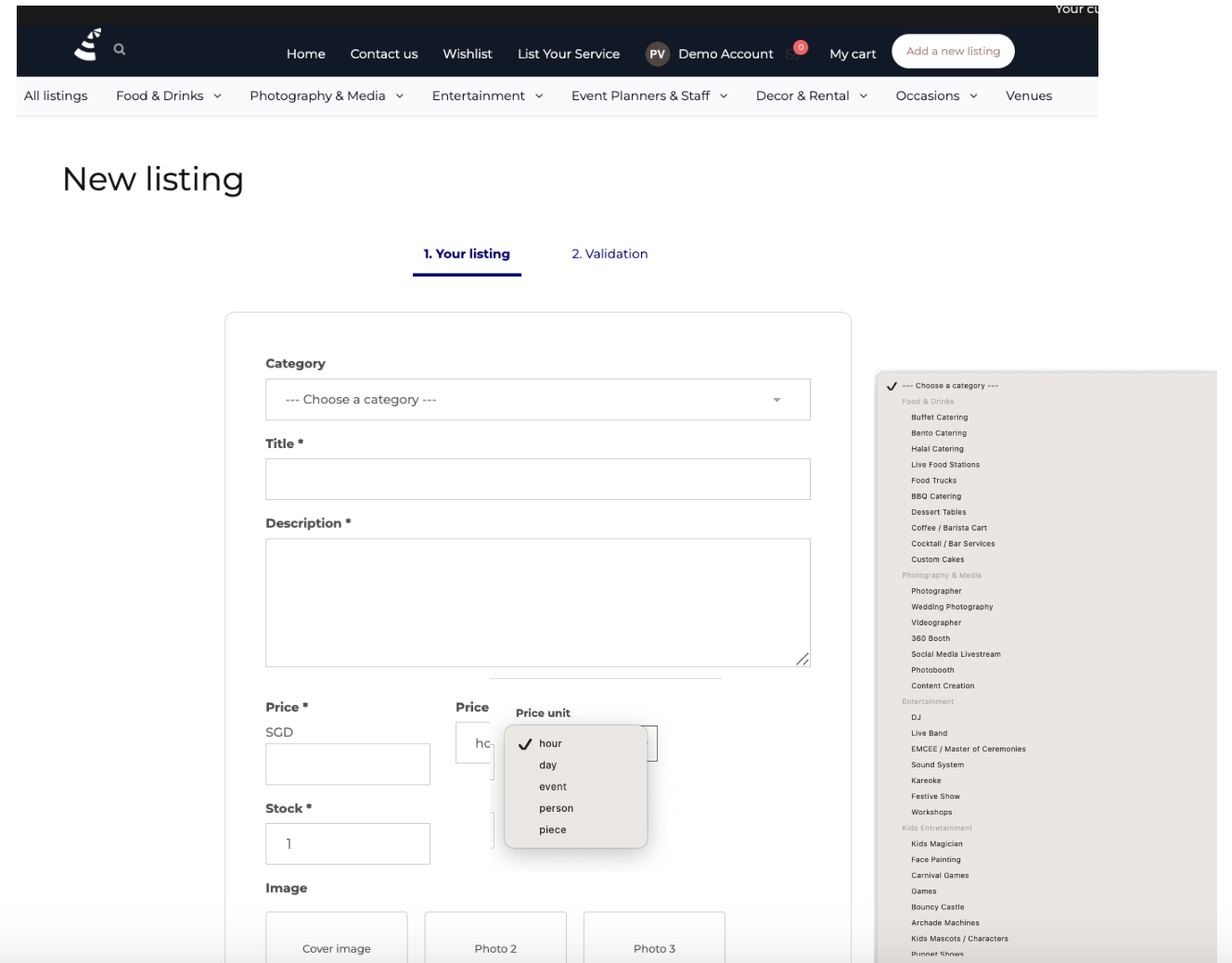
Key Recommendations:
- Category: Ensure the category accurately matches your service. Listings categorized incorrectly may be rejected.
- Title: Use a clear and professional title. Descriptive adjectives are encouraged (e.g., "Premium Hand-Crafted Cupcakes" instead of just "Cupcakes").
- Description: Please state all relevant information, including what is included in the service and any specific requirements.
- Price: State your actual starting price and select the correct unit. Avoid using "1 SGD" as a placeholder; listings without a real starting price will be rejected.
- Stock: This represents the maximum quantity or number of bookings you can fulfill per request/day.
- Location: Set to “Singapore.”
Best Practices for Photos:
General Recommendations:
|
✅️Best Choice |
❌Avoid |
|
Pro-Tip: 'Portrait mode' with a blurred background is highly encouraged. Crisp, professional-looking pictures are proven to drive more sales. |
❌Avoid Blurry or Dark Images: > Please ensure your photos are sharp and well-lit. Images that are blurry, dark, or hard to recognize on a small mobile screen make it difficult for clients to trust the quality of your service. |
|
✅️Use a clear image showcasing services |
❌Please avoid using images that consist only of text or graphics. These cannot be featured on Google Shopping, meaning you would miss out on significant free traffic. Google automatically rejects text-based images, so using high-quality photos ensures your listings get the visibility they deserve. |
For Physical Products
|
✅️Best Choice |
❌Avoid |
EXAMPLE FOR CAKE: ✅️A clear image showcasing the product. |
❌Digital images or images with no reference to the product you are offering. |
EXAMPLE FOR CAKE: ✅️ A clear image showcasing the product. |
❌Digital or Overly Edited Photos
|
✅️Background matters. Clear, relevant, ah-doc background is best, but not necessary. |
❌Your background choice can make or break a sale. You wouldn't want to see a photo of delicious cupcakes taken in a bathroom, right? Haha! (Don't worry, that photo is just AI, but you get the point!) |
Reminder: High-quality 'Portrait' photos with blurred backgrounds tend to sell best. You don't necessarily need professional equipment, just a clean, uncluttered or blurred background! :)
For Services
In order for us to advertise on Google Shopping, "Lifestyle Photography” is recommended and encouraged.
|
✅️Best Choice |
❌Avoid |
|
Lifestyle Photography EXAMPLE FOR BBQ CHEF: ✅️When listing a service or staffing, please use an image of the service in action, a lifestyle shot, or a high-quality representation of the service itself. |
Digital Assets
|
EXAMPLE FOR BBQ CHEF: |
❌A listing titled 'BBQ CHEF' may be confusing if the image lacks visual cues representing the service. For example, if a client doesn't see a BBQ chef in the photo, they may hesitate to book. Similarly, using an avatar-like picture instead of a real person can be disorienting for a party planner. |
|
EXAMPLE FOR Wedding Photographer: ✅️If you are a photographer, it is best to use photos that reflect your specific professional style, whether that is cinematic, documentary, classic, or another signature look. Copyright Notice: Please use your own original material so that customers have an accurate basis for their expectations. |
EXAMPLE FOR Wedding Photographer: ❌As mentioned previously, keep your profile picture and listing images distinct. While a professional headshot is perfect for your account avatar, listing photos should showcase your work or services so customers know exactly what they are booking. |
After creating your listing, you can continue to the next step of enabling payments